Voice
Your own Gemini API key.
Every AI feature in Adventure Builder runs on Google's Gemini, through a key you own. Google bills you directly, and Adventure Builder never sees your bill. Everything outside Voice works without one.
Getting started
Four steps, about five minutes.
- Get a key from GoogleCreate a Gemini API key in Google AI Studio at aistudio.google.com/apikey. It takes a minute.
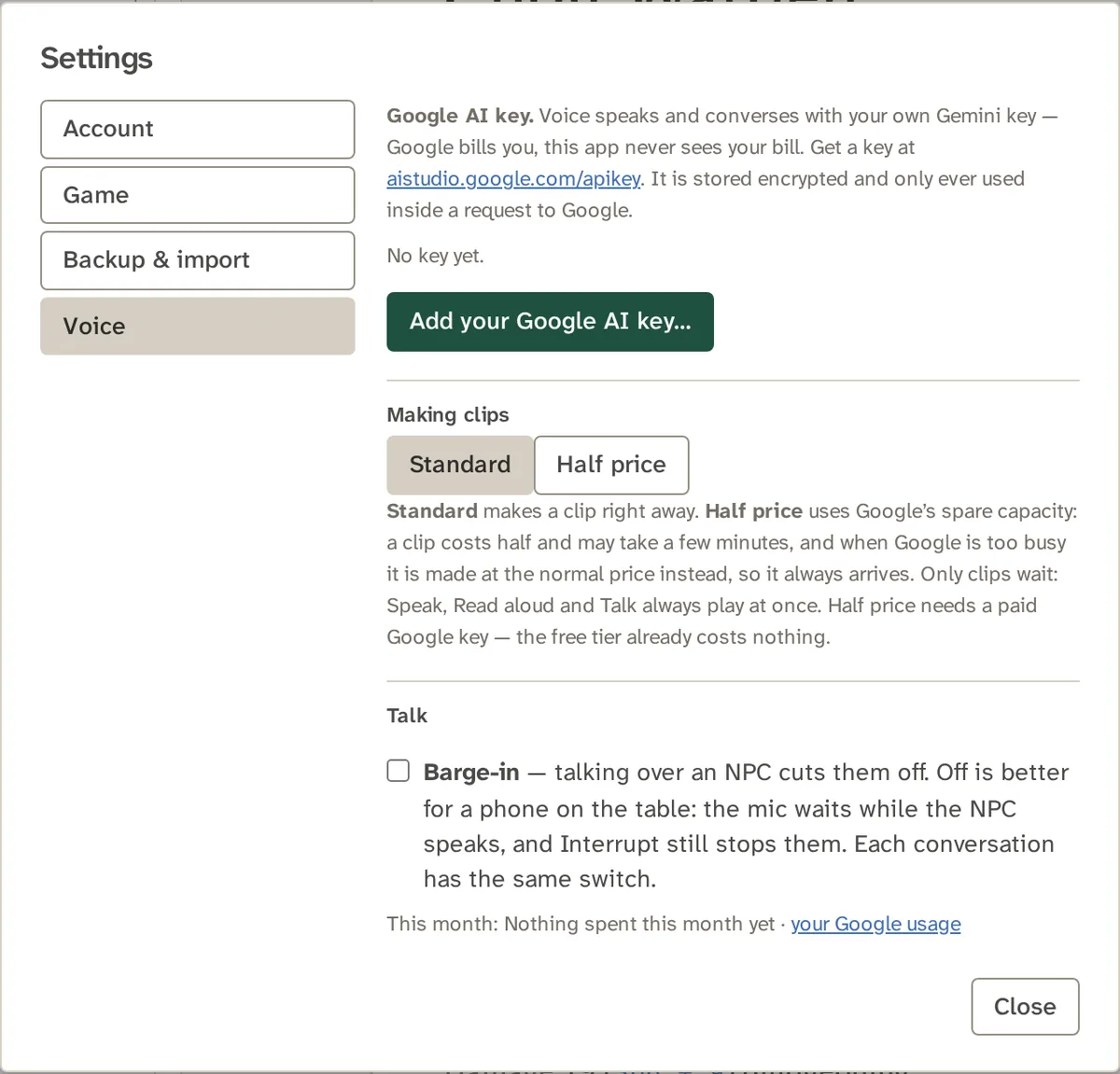
- Add it in Adventure BuilderOpen Settings, then Voice, press Add your Google AI key… (the app's name for the button) and paste your Gemini API key.
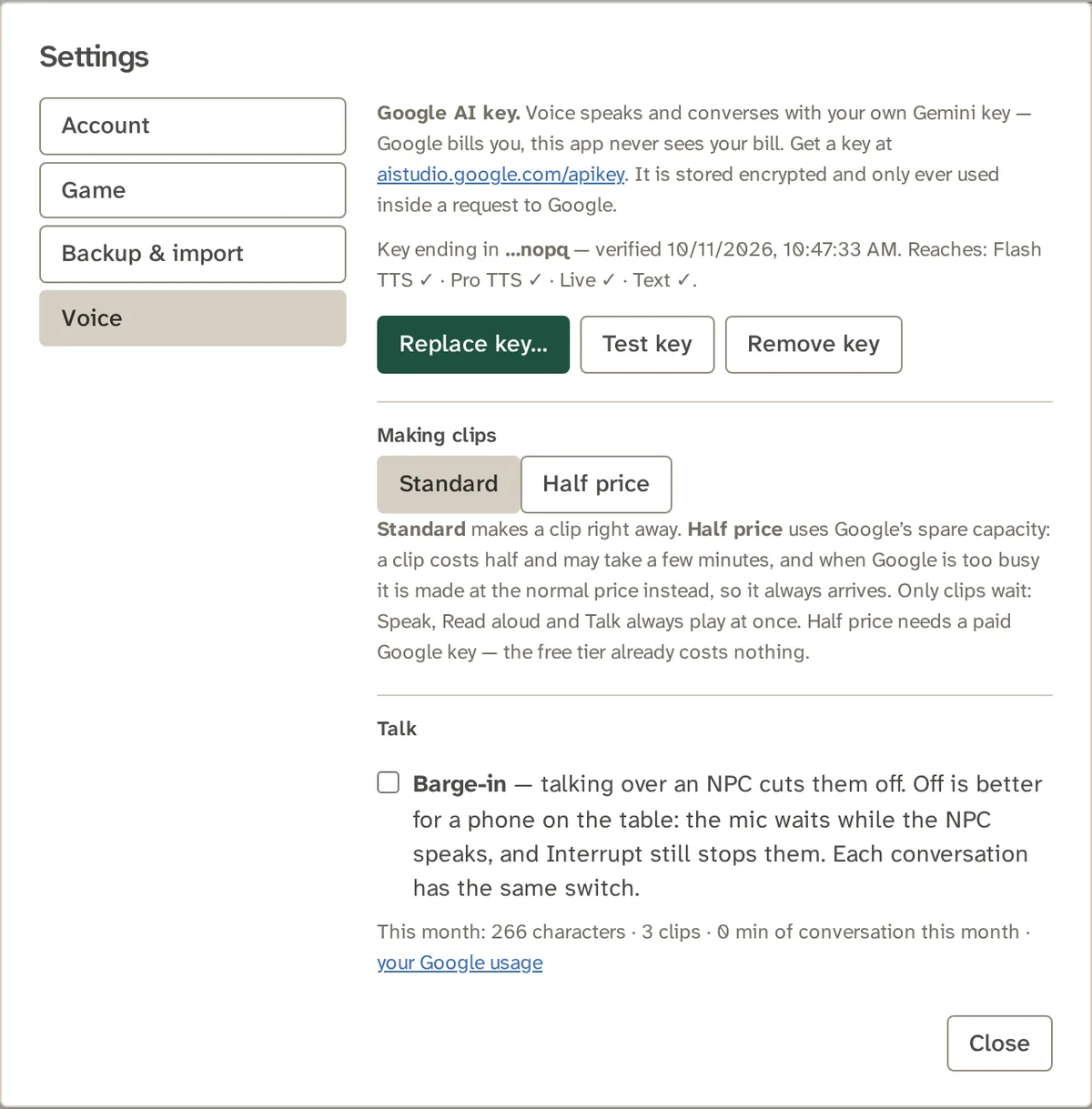
- It is checked before it is keptThe app asks Google which models your key can reach: speech at two speeds, live conversation and text. The result shows beside your key.
- Use VoiceSpeak a page, play a dialogue, or talk to an NPC. Remove or replace the key whenever you like.
What uses your key
Every AI feature, in one place.
- Speak and Read aloud, for a page, a note or a record
- Dialogue, a scene between up to six speakers
- Clips, saved as MP3 files
- Talk, a live conversation with an NPC
- Suggest from description, which casts an NPC's voice from what you wrote
- What they remember, short facts an NPC keeps from a conversation
Everything else, from the Library to the Combat Tracker, works without a key.
Money and control
Your key, your bill, your call.
Who pays?
You do, to Google, directly. Adventure Builder never sees your bill.
How do I see what I spend?
Settings shows this month's characters, clips and minutes of conversation, beside a link to your Google usage page. It is for your information and is never a limit.
What is Half price?
Standard makes a clip at once. Half price asks Google's spare capacity: it costs half and may take a few minutes. It needs a paid Gemini API key, because the free tier already costs nothing.
Before and after
What you will see in Settings.
Questions
About your key.
Do I have to use Voice?
No. Everything else, from the Library to the Combat Tracker, works without a key.
Where is my key stored?
On the server, encrypted. It is never shown back to you or anyone, and it is only used inside a request to Google.
Does my browser ever see my key?
No. For a live conversation the server asks Google for a single-use token that locks that conversation's persona, and your browser uses that token to talk to Google directly.
How do I remove my key?
In Settings, then Voice, press Remove key. Deleting your account removes it too, along with every campaign.
How do I know it works?
Press Test key. The status line shows the last four characters, when it was verified, and which models it reaches.
Can anyone else use my key?
No. It belongs to your account and is used for your own Voice requests only.
Can I use a free Gemini API key?
Yes, for the features the free tier allows. Half price clips need a paid key.
What does a key look like in the app?
A line such as "Key ending in …nopq", with the date it was verified and the models it reaches.
Give your table a voice.
Add a key when you want one. Everything else works without it.